

February 2026 has been… a lot. In the span of a few days, three very different AI upgrades landed almost on top of each other, and the combo feels bigger than any single launch.
OpenAI pushed real-time coding speed with Codex Spark. Google turned up serious reasoning with Gemini 3 Deep Think. And MiniMax made the case for cheap, always-on agents with M2.5 that can run for hours without your budget melting.
If you're a student, a creator, a solo developer, or a team inside a big company, this matters for one simple reason: AI is splitting into roles. One model to keep up with your typing, another to think carefully, and another to grind through work in the background all day.
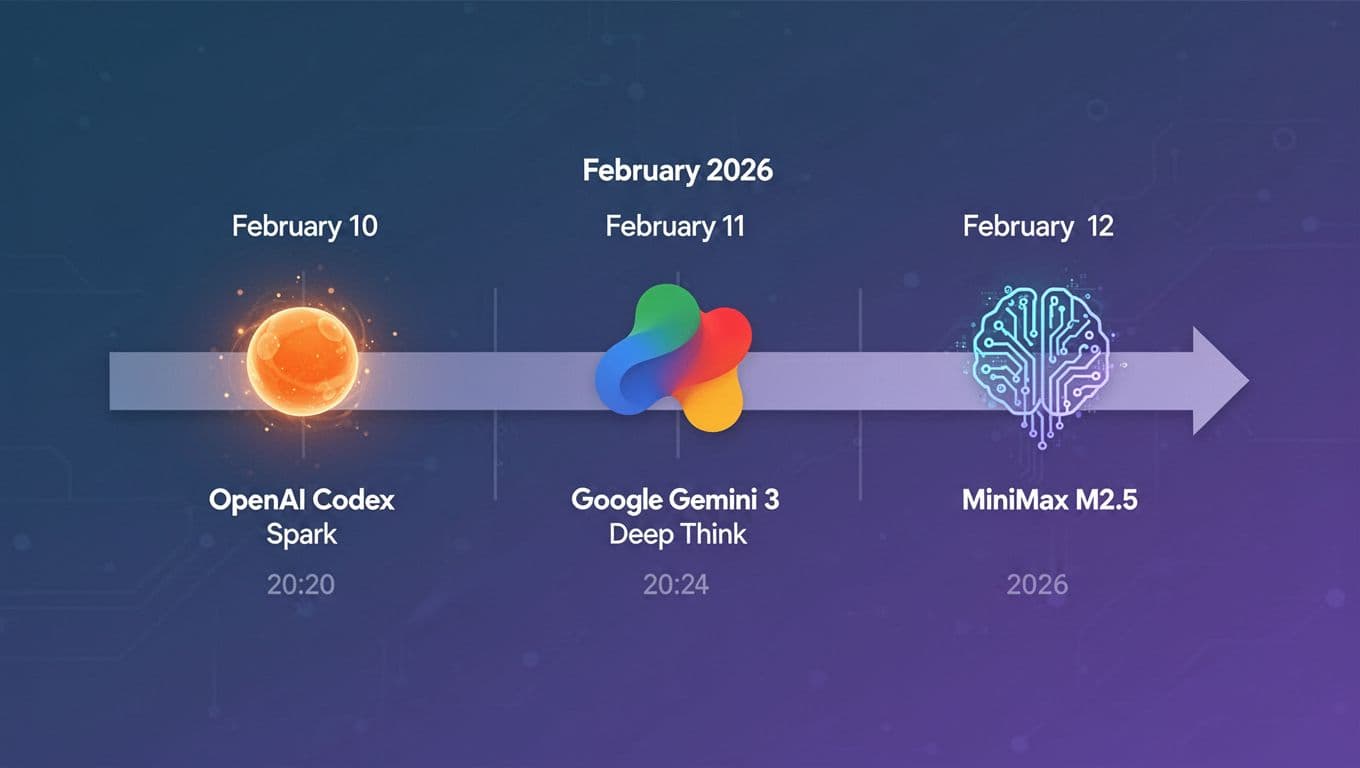
Timeline of the three releases discussed in this post, created with AI.
OpenAI Codex Spark is built for speed, so coding with AI feels instant
AI coding has been drifting into two styles. The first style is the "mission." You hand an agent a bigger task, it plans, uses tools, edits multiple files, and keeps going for a while.
The second style is more like playing ping-pong. You're in the editor. You change a function name. You tweak a UI state. You refactor a messy block. You want the assistant to respond fast enough that you don't lose your train of thought.
Codex Spark is built for that second style. OpenAI describes it as a smaller version of GPT-5.3 Codex tuned for fast inference, so it can feel near-instant in the loop (their launch post is Introducing GPT-5.3 Codex Spark). In the research preview, it's text-only and carries a 128k context window, which is plenty for a lot of real-world code and notes.
In other words, Spark isn't trying to be your "build a whole product from scratch while I'm at lunch" model. It's trying to be your pair programmer that doesn't make you wait.

Photo by Andrew Neel
Why Cerebras hardware matters, it is not just a smarter model
Speed isn't only about how smart the model is. Most people feel latency from the whole chain: session setup, network hops, time to first token, and even how smooth streaming feels.
Spark is tied to a hardware story too. OpenAI is serving it on Cerebras wafer-scale hardware, which is basically the "built for straight-line speed" approach. Instead of many smaller chips working together, it's a giant piece of silicon designed to push tokens fast. OpenAI also framed Spark as an early milestone in its partnership with Cerebras, and the size of that partnership signals it's not a side experiment.
Just as important, OpenAI pointed at pipeline work around the model, like faster first-token response, better streaming behavior, and persistent connections so the assistant stays responsive while you keep editing. That's boring engineering, but it's the difference between "cool demo" and "I actually want this running all day."
If you want a wider view of how quickly "agents that write code" are moving from novelty to normal, this connects well with NVIDIA's VibeTensor: AI coding agents build deep learning engine. Not because Spark builds deep learning runtimes by itself, but because the workflow shift is the same: more iteration, more automation, more trust in tests.
The tradeoff: Spark is faster, but not the strongest on big benchmarks
Spark's pitch comes with an honest trade. It gives up some raw strength so it can stay fast and snappy.
OpenAI backed that up with Terminal Bench 2.0 results: Spark around 58.4%, full GPT-5.3 Codex around 77.3%, and GPT-5.1 Codex Mini around 46.1%. You don't need to care about the test details to get the meaning. Spark sits in the middle.
So, Spark will feel great when you're doing dozens of small steps: rename things, adjust logic, polish UI components, write quick tests, or fix annoying lints. When the task turns into a harder engineering marathon, you may switch to the stronger model and accept the extra wait.
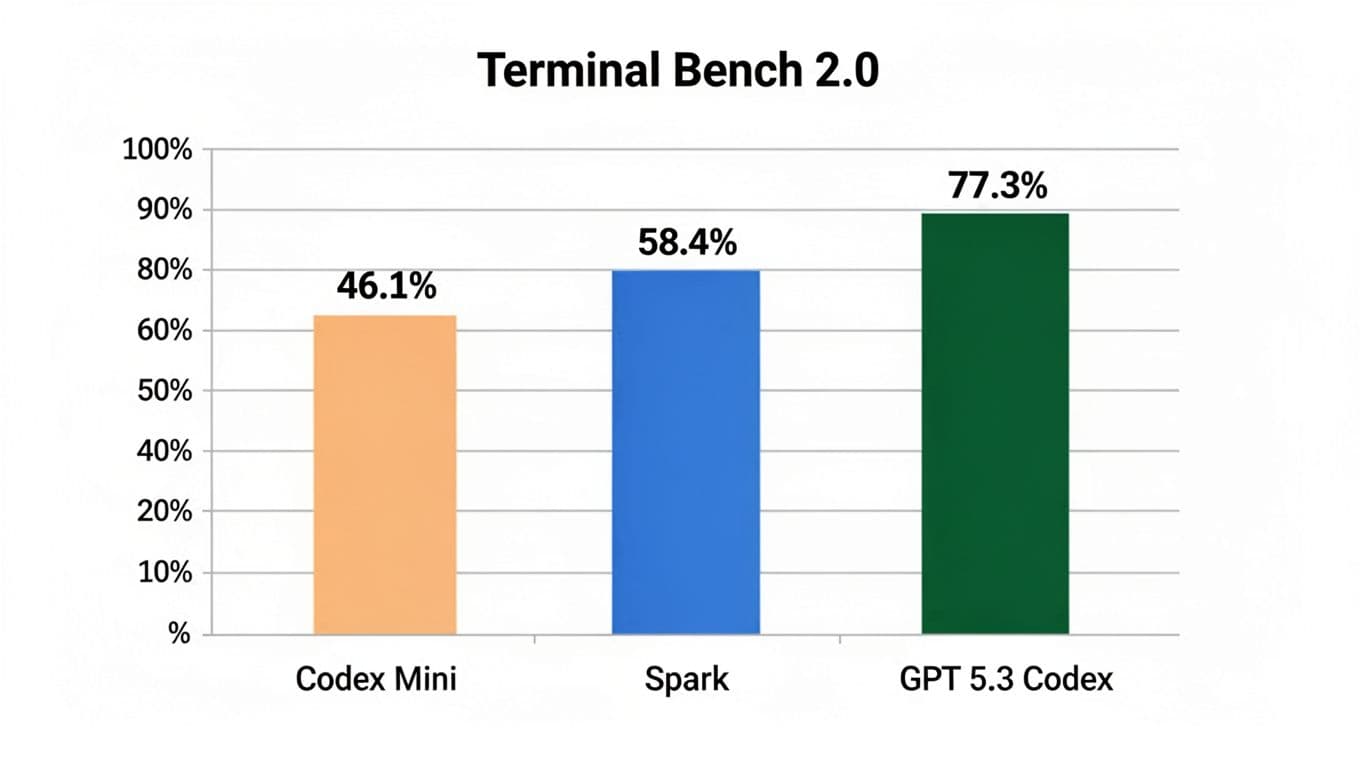
Speed versus strength on one public coding benchmark, created with AI.
A fast model that's "good enough" can beat a stronger model in real life, because it keeps you moving.
Google Gemini 3 Deep Think is the opposite: slower, but built to reason through hard problems
If Spark is about momentum, Gemini 3 Deep Think is about caution and depth. Google positioned Deep Think as a premium reasoning mode aimed at science, research, and engineering, the kind of work where a confident wrong answer can cost real money or real time.
A key idea behind Deep Think is test-time compute, which in plain terms means it can spend a bigger thinking budget before it answers. Instead of firing back instantly, it can internally check more paths and prune bad ones. That should mean fewer "sounds right, is wrong" moments, at least in the cases it's built for.
Availability also signals how Google sees it: it's in the Gemini app for Google AI Ultra subscribers, and it's coming to the Gemini API with an early access path for enterprise. Google's own framing is in Gemini 3 Deep Think: advancing science, research and engineering.
This is the lane for planning hard systems, verifying tricky edge cases, and working through math-heavy or research-heavy questions where you can't afford sloppy reasoning.
The benchmarks people are quoting, and what they actually mean
Deep Think arrived with a set of numbers people immediately started repeating. The scores matter less than what each test tries to measure.
Google highlighted results like 48.4% on Humanity's Last Exam (without tools), which is meant to be broadly difficult across many subjects. They also pointed to 84.6% on ARC-AGI 2, a test that tries to measure rule learning and generalization, not memorized patterns. Then there's about 3,455 Codeforces Elo, which maps better to competitive programming skill than many "toy" coding tests. Google also claimed gold medal level performance on IMO 2025, which is basically them saying, "yes, this can handle very hard math."
Benchmarks still have limits. They hint at capability, but they don't guarantee your exact workflow will be smooth. If you want the "why people stopped trusting charts" angle, this older post on GPT-5.2 backlash despite top coding agent performance captures the mood shift pretty well. People want reliability, not just numbers.
Sketch to 3D is the demo that makes it click for normal people
The Deep Think demo that sticks in your head isn't a benchmark chart. It's sketch to 3D.
The idea is simple: you draw something rough, the model interprets the intent, turns it into a structured 3D design, and outputs a file you can actually print. That's a clean bridge between fuzzy human input and a real artifact.
It also points to where "reasoning" becomes useful for regular people. You're not asking the model to solve puzzles for fun. You're asking it to translate messy intent into something concrete, often through code or structured outputs that other tools can use.
This is the kind of capability that will sneak into classrooms, maker spaces, and product teams. A student can prototype a part. A creator can design a simple prop. A small team can mock up a housing or bracket without becoming CAD experts overnight.
MiniMax M2.5 changes the math: always-on agents become realistic when they are cheap
MiniMax approached the week from a different angle. Spark is speed. Deep Think is depth. M2.5 is economics.
MiniMax's M2.5 is presented as a model trained heavily with reinforcement learning across a huge number of environments, with a focus on agent work: tool use, search, coding, and office-style deliverables. The practical takeaway is cost changes behavior. When running an agent feels expensive, you babysit it and you limit retries. When running an agent feels cheap, you let it try, fail, retry, and keep going.
That's why the "always-on" pitch matters. A cheap agent can sit in the background doing unglamorous work: checking docs, drafting slides, running comparisons, pulling sources, and reformatting reports.
VentureBeat's coverage framed it bluntly, that M2.5 is near top-tier while costing far less, in MiniMax's new open M2.5 and M2.5 Lightning.
The bold productivity claims, and how to read them safely
MiniMax made some big internal claims. They said M2.5 runs inside their own agent system and completes a meaningful chunk of company tasks autonomously across teams, and that a large share of newly committed code comes from the model.
Take those numbers as directional, not universal. Every company has different code review rules, different risk tolerance, and different task types. Still, the signal is important: they're describing a workflow where AI isn't a side helper. It's part of operations.
MiniMax also emphasized judging output like a professional deliverable, not just "did it answer." They talked about evaluating the final result and the professionalism of the process, especially for Word, PowerPoint, and Excel style work. That sounds boring, but it's where real jobs live.
If you're tracking the bigger shift from chatbots to agents you can run and control, this ties into GLM 4.6V: open-source multimodal coding agent. Different model, same trend: agents are becoming a product category, not a feature.
Speed, context, and pricing: why this is disruptive for agent builders
MiniMax also played the spec game in a way that matters for builders: 128k context, support for caching, and a "Lightning" variant aimed at throughput.
The headline story, though, is pricing. MiniMax's narrative is that you can run the model continuously without thinking about cost every minute. They cite an example around $1 per hour at high token rates, and lower at smaller rates, which lines up with published Lightning pricing like $0.30 per million input tokens and $2.40 per million output tokens.
Agents burn tokens because they loop. They search, call tools, retry, and compare. Lower cost doesn't just save money. It changes what you even attempt.
When retries get cheap, you stop asking "is it worth it?" and start asking "why not run it?"
So what now: how to pick the right model for your work this week
All three releases make more sense if you treat them like tools in a kitchen. You don't use a chef's knife for soup. You don't use a blender to slice bread.
Here's a quick way to think about it, without turning your week into a model-choosing contest. This table is only meant as a starting point.
| If your main need is… | Pick this lane | A real example that fits |
|---|---|---|
| Fast back-and-forth edits | OpenAI Codex Spark | Refactor a React component while you tweak UI states |
| Careful reasoning under uncertainty | Gemini 3 Deep Think | Work through a tricky algorithm, then double-check edge cases |
| Long-running automation at low cost | MiniMax M2.5 | Run a research agent that gathers sources, drafts a summary, and repeats daily |
A few safety habits matter more than the model choice.
Keep tests close to your coding loop. Ask the model to list assumptions before it edits core logic. For anything important, run a quick "show your work" pass where it explains why it chose that approach. Also, don't hand over sensitive data unless you've checked policies for the specific product and plan you're using.
If you're building something bigger with agents, it helps to think about validation loops, not just prompting. I wrote more about that mindset when covering AI agents engineer PyTorch-like framework from scratch, because the same principle shows up everywhere now: build, test, compare, repeat.
What I learned after trying to keep up with all three launches
This past week, I tried to use all three "lanes" in one messy, normal workflow. Not a demo. Just my real tabs, real deadlines, and the usual distractions.
Spark became my quick-refactor buddy. I'd paste a function, ask for a tighter version, then I'd immediately nudge it, "keep the public API the same," or "don't change behavior, only readability." The speed mattered more than I expected. When the replies came back fast, I stayed in flow. When I used slower models for the same kind of micro-edit, I kept losing the thread and re-reading my own code.
Deep Think came out when I hit a logic knot. You know the feeling, when a bug isn't in one line. It's in your mental model. I used it to reason through edge cases and to suggest a test matrix. The answers felt more careful. It didn't magically make me right, but it reduced the "confident nonsense" moments.
MiniMax M2.5, for me, worked best as background muscle. I'd hand it a research task, ask for a draft doc, then have it re-check sources and rewrite. I also used it for repeated checks, like "compare these two versions and list behavior changes." Cheap loops made me less stingy. I didn't hover as much.
I did make one dumb mistake, though. I trusted a clean-looking answer too fast, and I almost shipped it. The model sounded sure, and I wanted to move on. The fix was simple: I now ask for a tiny test plan first, even if it's just 3 tests, and I run them before I accept the patch. It adds a minute, but it saves that awful 2 a.m. feeling later.
The bigger change in my head is this: I don't think "one best model" anymore. I think in roles. Fast typing partner, careful reasoning partner, and cheap worker that doesn't get tired.
Conclusion
The shocking part of February 2026 isn't that AI got better. It's that AI got specialized in a way you can feel right now: fast copilots for coding, deep reasoning modes for high-stakes thinking, and low-cost agents you can keep running all day.
A simple next step: pick one small task for each lane this month, time it, and write down a few safety rules you'll follow every time. You'll learn more from that than from a week of scrolling benchmarks.
If this is the new normal, the real skill isn't chasing every release. It's building a workflow you actually trust, then sticking with it.


0 Comments