

If your AI images still look “kind of AI,” it’s usually not because your prompt is bad. It’s because you picked the wrong model for the job.
In January 2026, there are more strong image models than ever. That sounds like progress, but it also explains why so many people get weak results. One model nails natural skin texture and casual lighting, another is built for fast edits, another is the only one that can reliably put clean text on a poster.
This guide breaks down the best AI image generators to use in 2026, with simple “use this for that” picks: photoreal images, fast edits, posters with text, vector-like design, and open-source control.
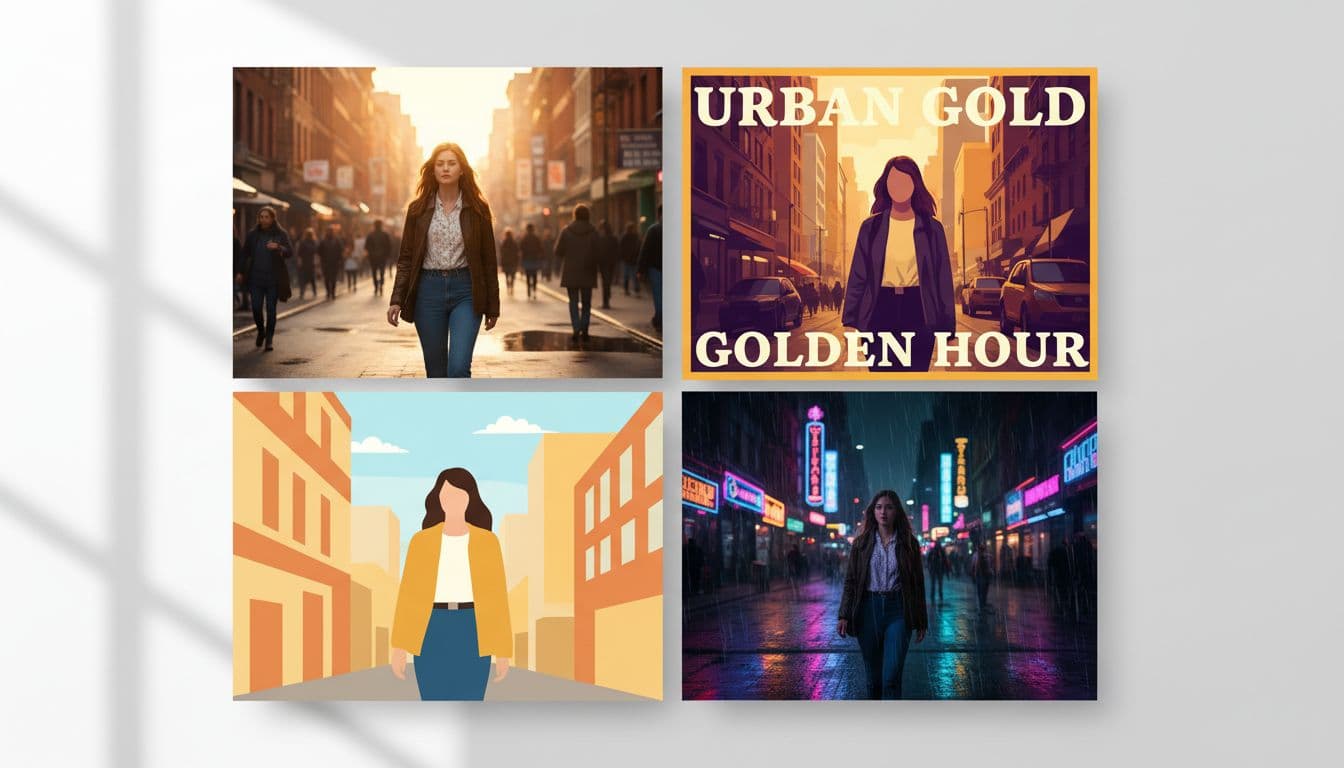 A side-by-side collage showing how the same idea can look wildly different depending on the model, created with AI.
How to choose the best AI image generator in 2026 (without wasting hours)
Before you open another tab and start testing random prompts, decide what “good” means for your project. Most frustration comes from asking a model to do something it wasn’t built to do.
Here’s what to decide first:
- Goal: Do you need a realistic photo, concept art, a product mockup, or a poster layout?
- Generate vs edit: Are you creating from scratch, or fixing an existing image?
- Speed: Do you need results in seconds, or are you fine waiting for quality?
- Price per output: If you generate a lot, cost matters as much as quality.
- Prompt strictness: Do you need the model to follow detailed instructions closely?
A lot of creators end up using two tools, not one: a main generator for the base image, then a second model that’s better at edits, typography, or layout.
If you want a broader list of popular tools people use right now, Zapier keeps a running roundup in their guide to the best AI image generators in 2026.
Fast decision checklist: realism, style, text, and control
When you’re comparing models, these are the traits that actually show up in your final image:
Photoreal details: Look for natural skin texture, believable reflections (water, glass, metal), and lighting that doesn’t feel “movie poster” unless you asked for it.
Consistent characters: If you’re making a series, character drift is the silent killer. Some models keep faces and outfits stable across variations, others don’t.
Long-prompt handling: A few models understand long, detailed prompts well. Others do better with short prompts and step-by-step iteration.
Text inside images: This is still a make-or-break feature in 2026. Many “photo” models can’t produce clean headlines, logos, or small subtext reliably.
Control settings: If you like using seeds, steps, guidance, and aspect ratios, you’ll want a model that exposes those controls (or a UI that does).
Two common mistakes to avoid:
- Using a stylized art model for product photos, then wondering why the bottle label looks fake.
- Expecting perfect poster typography from a photoreal model, then spending an hour correcting misspelled words.
Generate vs edit: why the best workflow is often a 2-model stack
A pattern shows up quickly when you test models side by side: some are better at creating images, others are better at changing images.
A simple workflow that saves time:
- Generate a base scene with your main model (get composition and mood right).
- Upload that image into an edit-focused model.
- Ask for one clean change, like “turn the subject toward camera,” “make it sunny,” or “swap the jacket color,” without breaking the whole image.
This is also where you stop writing huge prompts. For edits, short instructions often work better than a paragraph.
Best AI image generators you need to use in 2026 (quick picks by use case)
If you’re trying to find the best ai for image generation, the fastest path is matching the model to the job, not hunting for one “perfect” tool.
Here’s a quick snapshot:
| Tool/model | Best for | Why you’ll keep it in 2026 | Main limitation |
|---|---|---|---|
| OpenAI GPT Image (in ChatGPT) | General use, text, iterative edits | Strong instruction following and text handling | Can be slower, best quality is often paid |
| Google Nano Banana Pro | Realistic photos and fast edits | Speed plus consistent, natural-looking changes | Not always ideal for very stylized concept art |
| ByteDance Seedream (Cream 4.0) | Best value, versatile from-scratch gen | Fast, sharp detail, works across many styles | Typography usually lags behind text-first tools |
| Ideogram + Qwen Image | Posters, logos, layout-heavy ad work | Clean typography and precise edits | Less “photo-real magic” than photo-first models |
| Flux 2 + Midjourney v7 | Open-source control + cinematic art | Custom pipelines plus top-tier stylized moodboards | Not the best choice for perfect text |
For more third-party testing and editorial comparisons, PCMag’s roundup is useful context: The Best AI Image Generators We’ve Tested for 2026.
Best all-around: OpenAI GPT Image (smart prompt following, strong text, easy iteration)
If you want one tool that’s hard to mess up, start here.
OpenAI’s image generation inside ChatGPT is great at understanding intent, especially when your prompt has multiple constraints (wardrobe, setting, camera angle, mood, plus text). It’s also one of the better options for text inside images, like headlines on a thumbnail or label text in a mockup.
Why it wins in 2026
- Strong prompt interpretation, even when you describe the image like you’re talking to a designer.
- Great iteration loop, you can refine the same image in conversation.
- Very capable with lighting, realism, and layout requests.
One limitation
- It can be slower than speed-first tools, and the best quality typically sits behind paid plans.
Beginner tip Start simple: one subject, one setting, one lighting cue. Then add details in a second pass. You’ll get cleaner results than packing everything into a single mega-prompt.
Best for realistic photos and fast edits: Google Nano Banana Pro
Nano Banana Pro has a “get it done” feel. It’s fast (often seconds, not minutes), and it’s unusually good at edits that would break other models.
In testing, simple edit instructions like “turn the face toward the camera” or “make the weather calm and sunny” can produce a believable result without weird morphing. It also tends to avoid that glossy, doll-like look, which helps when you want images that feel like casual real-world photos.

Why it wins in 2026
- Very fast generation (often quoted in the 3 to 20 second range).
- Strong realism for tricky surfaces like water and reflections.
- Excellent “edit this image” performance with short instructions.
One limitation
- It can be hit or miss when you want heavy stylization or complex concept art.
Beginner tip Use it like a photo editor. Generate your base image elsewhere, upload it, then request one specific change at a time.
If you want a deeper walkthrough on features and controls, this internal guide is a strong starting point: Google’s Nano Banana Pro image model guide.
Best value and versatile generator: ByteDance Seedream (aka Cream 4.0 in some apps)
Seedream is the model you keep open when you don’t know what’s coming next. It’s a true generalist: portraits, editorial fashion, product-style shots, even stylized work can all land well.
What stood out in testing was detail and texture, especially natural-looking skin and convincing frost or makeup textures in fashion prompts. It’s also fast, and it’s often cheaper per image than some premium options, which matters if you generate daily.
Why it wins in 2026
- Strong from-scratch generation across many styles.
- Sharp details and believable textures.
- Speed and cost make it practical at scale.
One limitation
- It usually doesn’t beat text-first tools when typography matters.
Beginner tip For portraits and product work, explicitly ask for “natural skin texture” and “realistic reflections.” It nudges the model toward less plastic-looking output.
For another broad comparison perspective, WaveSpeedAI has a long-form breakdown: Best AI Image Generators in 2026: Complete Comparison Guide.
Best for posters, logos, and clean text: Ideogram (and Qwen Image for precise design edits)
Text is still the hard part. If you make thumbnails, posters, quote cards, or ads, you already know the pain: a beautiful image with misspelled words is useless.
Ideogram is a go-to for clean typography in-image. It’s the one you reach for when the words have to look intentional, not like a mistake you’ll fix later.
Qwen Image is different. It’s ideal when you need “change only what I asked” behavior for design edits. For example, swapping a headline, adjusting a layout element, or changing a small detail without shifting the whole image.
Why they win in 2026
- Better text rendering and layout sense than most photo models.
- Qwen’s precision helps for ad variants and controlled edits.
One limitation
- If you want pure photoreal photography, Nano Banana Pro or Seedream usually looks more natural.
Beginner tip When making posters, keep the copy short. One headline and one subhead gets better results than a paragraph.
If you want a broader “what people use” list alongside these, LargeMi’s updated post is another reference point: Best AI Image Generators in 2026.
Best for open-source control and pro pipelines: Flux 2 (plus an artistic pick for concept art)
If you like owning your workflow, open-source models still matter. Flux 2 is popular for realistic output plus control, and it fits teams that care about repeatability, tuning, and custom pipelines.
For pure style and moodboards, Midjourney v7 still dominates the “cinematic concept art” look, with noticeably better textures and stronger anatomy than earlier versions.
 Photo by Sanket Mishra
Why they win in 2026
- Flux 2 fits controlled, repeatable production work.
- Midjourney stays a top pick for stylized art direction and mood.
One limitation
- Neither is the best choice if you need perfect text on a poster.
Beginner tip Save your seeds and settings when you find a look you like. Consistency is half the battle in a series.
Simple prompts and settings that make any model look better
You don’t need fancy “prompt engineering,” but you do need structure. Think of it like ordering coffee. “Coffee” works, but “iced latte, oat milk, light ice” gets you what you pictured.
A universal prompt template you can reuse (and how to adjust it per model)
Use this order. It works across most tools:
Subject: who or what it is
Setting: where it is
Action: what’s happening
Lighting: time of day and light quality
Camera: lens feel or shot type
Style goal: photo-real, editorial, poster, vector-like
Details: 2 to 4 specifics that matter
Example 1 (dramatic scene, good for from-scratch generators):
A rescue worker on a rocky shoreline during a violent storm, waves crashing behind them, signaling toward a distant helicopter, rain blowing sideways, dark clouds with a thin backlight, cinematic photo, sharp detail, wet stone reflections.
Example 2 (portrait, good for realistic models):
Close-up portrait of a Tokyo traveler in light rain, raindrops on jacket, soft background lights, natural skin texture, casual street photo, realistic color and grain, shallow depth of field.
How to adjust per model:
- Long-prompt models: add environment detail and materials (wet stone, fog, fabric weave).
- Edit-focused models: keep it short, request one change, and stop there.
The settings that matter most: resolution, aspect ratio, seed, and steps
Resolution: Use high resolution when you plan to crop, print, or zoom in. Don’t default to 4K for everything, it’s slower and costs more.
Aspect ratio: Match the output to the job. Posters want vertical, YouTube thumbnails want wide, phone wallpapers want tall.
Seed: Think of a seed like a “starting roll of the dice.” Reusing it helps keep a series consistent.
Steps: More steps can improve detail up to a point, then it just gets slower. If your image already looks right, extra steps rarely fix composition problems.
What I learned from testing these models (my real 2026 workflow)
After running the same prompts across a lot of models, the big lesson was simple: each model has a personality. Some default to dramatic lighting, some stay grounded and “phone photo” natural, some turn everything into poster art even when you didn’t ask.
My current workflow is a three-part setup:
- Main generator: Seedream when I’m building a scene from scratch and need solid detail fast.
- Fast editor: Nano Banana Pro when I need clean changes without breaking the image.
- Text and layout: Ideogram (or Qwen Image for precise edits) when words and spacing matter.
I also prefer using a platform that lets me switch models quickly in one place (OpenArt is a good example of that approach). It saves time and cuts down on subscriptions, especially when new models show up and you want to test them side by side.
If you only pick two tools:
- Creators (YouTube, social): GPT Image + Ideogram (generation plus text).
- Designers: Ideogram + Qwen Image (typography plus controlled edits).
- Business owners: Seedream + Nano Banana Pro (consistent product visuals plus quick fixes).
Conclusion
There isn’t one perfect model for everyone in 2026. The best results come from matching the model to the job, then building a simple workflow you can repeat.
Pick your main use case, choose one generator plus one helper tool (editing or text), run the same prompt 10 times, and save what works as presets. Your output quality will jump fast, and it’ll stay consistent.
What are you trying to make this year, photos, product shots, posters, logos, or concept art?


0 Comments