

Back in 2023 through 2025, the promise was loud: AI would write the code, ship the features, and wipe out most developer jobs. If you watched a few slick demos, it was easy to believe. Type a prompt, get a working app. Ask for a fix, get a patch. Ask for tests, get a test suite.
By January 2026, the reality looks different. AI is everywhere in coding workflows, but teams still need engineers to ship software that survives real users, real outages, and real business pressure. In some companies, hiring shifted toward senior talent while entry-level roles thinned out, but the work didn’t disappear. It changed shape.
 An engineer and an AI assistant working side by side, created with AI.
The simple reason the “replacement” story failed is also the most important takeaway: coding isn’t just typing syntax. Software development is problem solving with messy human inputs. It’s translating fuzzy needs into clear behavior, then owning what happens in production.
This article breaks down why the hype felt believable, where AI still struggles, what it’s genuinely good at, and how developers can stay valuable as the job keeps shifting.
Why people thought AI would replace developers
A lot of the hype came from a common misunderstanding: people assumed software work was mostly “write code faster.” If a model can generate code, then the job is done, right?
That logic works for demos. Demos are designed to be clean.
Production software is not clean.
A demo app is a tiny world with tidy rules:
- One happy path
- A small codebase
- Few dependencies
- Clear success criteria
Production software is the opposite:
- Old decisions you can’t undo
- Security rules and compliance
- Performance constraints
- Two years of “temporary” workarounds
- Many stakeholders, all with different priorities
If you want a grounded view of how AI has changed expectations, and why career paths are shifting instead of vanishing, Stack Overflow’s perspective on juniors and hiring trends is worth reading: AI’s impact on the junior developer pathway.
Coding looks like typing, but development is solving unclear problems
Here’s a request that sounds simple: “Build a payment system.”
A non-engineer often means “let users pay.” A developer hears a swarm of questions:
What payment providers? Subscriptions or one-time? Refund rules? Chargebacks? Taxes? Multi-currency? Fraud signals? Receipts? Idempotency? How do we handle retries? What happens when the provider is down?
Most clients don’t know those answers until someone asks. They aren’t hiding info, they just haven’t lived inside the edge cases yet. That’s normal.
This is one of the big gaps with AI: it takes words literally. It doesn’t naturally interrogate a vague request the way an experienced engineer does. It can generate a clean checkout page. It can’t reliably pull hidden business rules out of a sentence.
The “software” part is often easy. The hard part is turning unclear human intent into behavior you can test and support.
AI demos (and agent tools) work best when the task is small and well-defined
Agent-style coding tools look incredible in contained environments: fix a single issue, implement one feature, follow clear acceptance criteria. That’s why launch videos go viral.
We saw this pattern with autonomous “AI engineer” claims in 2024. The public demos looked like the future. Then people tried these tools on real production repos and hit the wall fast: partial context, missing constraints, brittle refactors, and lots of time spent cleaning up.
A good summary of why coding agents still struggle outside controlled tasks is here: Why AI coding agents aren’t production-ready.
Where AI still falls short in real software teams
AI can write code. It can even write decent code. The reason it didn’t replace developers is that the “hard parts” of engineering are still human-heavy:
- Context
- Ambiguity
- Accountability
Also, the productivity story is not as simple as “it makes everyone faster.” A widely shared experiment reported that experienced developers actually took longer with AI on certain tasks, because prompting, waiting, and reviewing ate the gains (covered here: Fortune’s report on developers taking longer with AI).
In practice, AI helps most when you already know what you’re doing, and you have a strong review process.
 A shared path forward where engineers and AI work together, created with AI.
The context window problem in large codebases
Most serious apps aren’t a single file. They’re thousands of files with shared rules.
Even with long context windows, an AI assistant can only “see” a slice at a time. That creates a very human kind of failure: it makes changes that look right locally, but don’t match the system’s deeper patterns.
This shows up in refactors and cross-cutting changes:
- A new helper function breaks a subtle invariant.
- A renamed field gets updated in 20 places, but missed in 3.
- A change that should update logging, metrics, and docs only updates one.
- A “simple” performance fix creates a race condition.
Humans struggle with this too, but teams use architecture, code review, tests, and shared mental models to handle it. AI doesn’t truly carry that mental model. It approximates it from whatever you pasted in.
The requirements problem: AI takes words literally, but humans read between the lines
Software breaks in the gaps between what people said and what they meant.
A booking tool is a great example. “Users can book appointments” sounds done until someone asks:
- Can they cancel?
- Is there a refund window?
- Group bookings?
- Different rules for members vs non-members?
- Double-booking prevention?
- Time zones and daylight savings?
Those missing details turn into bugs, support tickets, and angry customers.
This is why some teams that tried to “swap developers for AI” ended up hiring developers back. The code wasn’t the bottleneck. The bottleneck was clarifying the product and shaping it into something reliable.
The decision-making problem: good code is full of tradeoffs
A lot of engineering decisions aren’t about “what works.” They’re about “what’s worth it.”
Teams constantly trade:
- Readability vs speed
- Shipping today vs cleaning debt
- Convenience vs security
- Cheap now vs scalable later
AI can propose options quickly, and that’s useful. But it can’t own the consequences. It doesn’t feel the pain six months later when a rushed decision makes every change twice as hard. It also doesn’t know your team’s skills, your deadlines, or which risks your business can tolerate.
That’s why the developer role persists. Someone has to choose, explain, and take responsibility.
Quality and security risks are real without strong review
Unchecked AI code tends to create rework. Large-scale analyses and team reports have found higher churn, meaning more “fix and revert” cycles, compared to purely human-written changes. That makes sense: if you accept code you don’t fully understand, you usually pay later.
Security risk is similar. Some security leaders have reported real incidents caused by AI-written code slipping into production without proper review. The point isn’t panic. The point is process.
AI works best with guardrails:
- Code review
- Automated tests
- Static analysis and dependency scanning
- Threat modeling for sensitive features
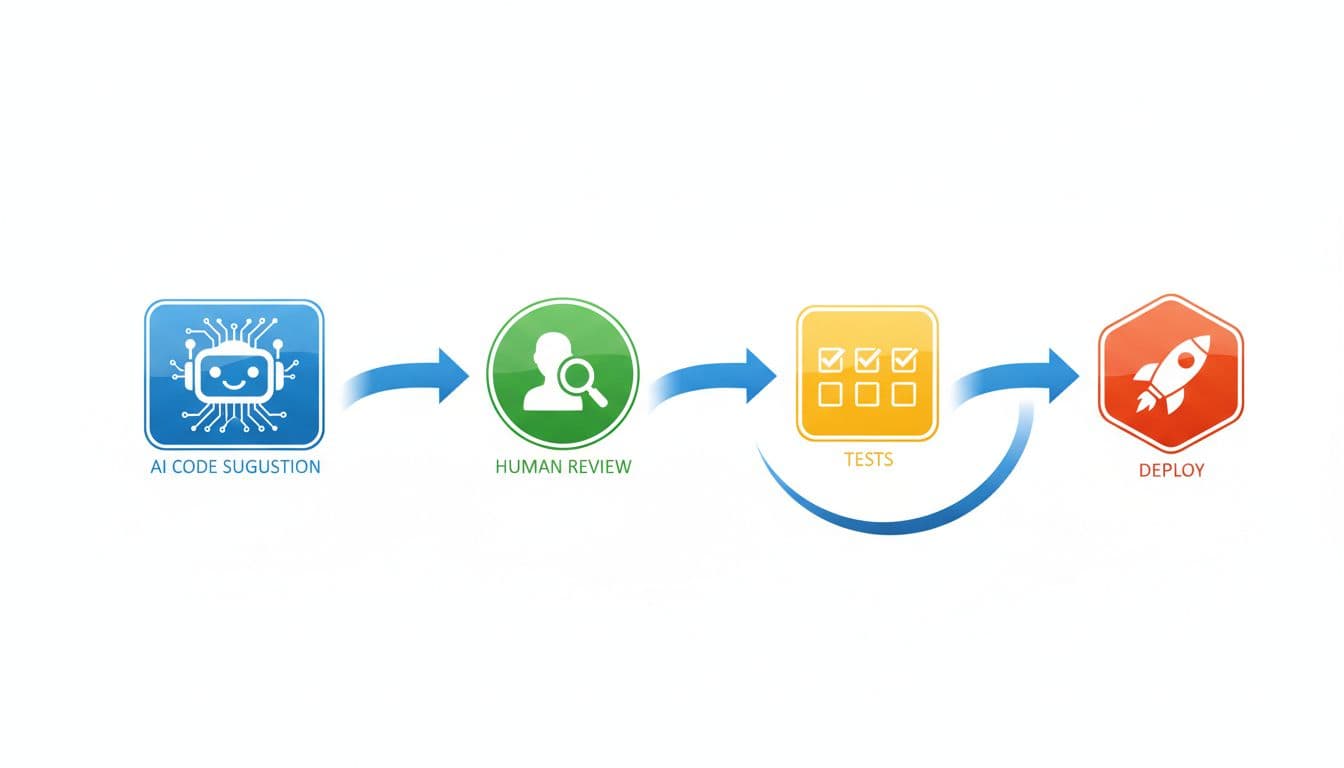 A simple AI-assisted path from suggestion to review, tests, and deployment, created with AI.
If you want a broader look at how widely AI is already used in coding, and why some developers still don’t fully trust it, this article is a strong snapshot: MIT Technology Review on AI coding being everywhere.
What AI is great at, and how developers are using it as a power tool
AI isn’t a replacement for engineers. It’s more like a power drill for carpenters. It turns slow, repetitive work into quick work. The carpenter still chooses where to drill, and what happens if the wall collapses.
In daily development, AI shines at:
- Boilerplate and scaffolding (API routes, CRUD handlers, serializers)
- SQL queries and query rewrites
- Unit test templates and edge-case brainstorming
- Docstrings and internal documentation drafts
- Translating logic across languages (Python to TypeScript, for example)
- Showing two or three implementation approaches fast
Some teams report productivity gains around a third on the right kinds of tasks, especially repetitive ones. That’s consistent with the “force multiplier” story. It’s also consistent with why some controlled experiments show slowdowns: if the task is subtle and review-heavy, the overhead can erase the benefit.
For a quick stats-heavy roundup of adoption and usage patterns, this compilation is useful as a reference point: AI in application development statistics (2026).
The best workflow: developer sets direction, AI drafts, human verifies
The loop that works (and keeps you safe) is simple:
- Define the goal and constraints (performance, security, style, deadlines).
- Ask AI for a first draft (or multiple options).
- Review line by line until you understand it.
- Add or update tests that cover failure modes.
- Run it locally, then refactor for clarity.
- Ship with normal review and monitoring.
In this loop, the developer supplies the product context and architecture. AI supplies speed on the tedious parts.
If you want practical ideas for how people are using AI tools in day-to-day engineering prep, this internal guide is a solid companion: https://www.revolutioninai.com/2025/12/10-ai-tools-that-make-coding-interviews-feel-easy.html?m=1
Why companies still need more builders when software gets cheaper to create
When software gets cheaper to build, demand usually expands.
A business that used to ship two features per quarter now asks for six. A team that avoided automation because it was “too much work” suddenly wants workflows everywhere. This is why “AI makes developers faster” doesn’t automatically mean “fewer developers.” Often it means more ambition.
That said, the early 2026 job market has real tension. Entry-level roles have tightened, and some reports point to a meaningful drop in junior openings since 2022 as AI handles simpler tasks. Senior engineers who can design systems, review AI output, and own decisions are still in demand.
This is the shift: the job is moving away from pure syntax production and toward system thinking and judgment.
What I learned: how to stay valuable in the AI era (even as roles change)
When I started using AI daily, the biggest change wasn’t how fast I could type. It was how often I could test ideas.
I now treat AI like a noisy but eager teammate. It can sprint, but it needs direction. If I’m vague, it confidently ships the wrong thing. If I’m clear, it saves me hours.
A few habits made the difference:
I write constraints first. Before asking for code, I state what must not change (public API shape, performance limits, auth rules). This cuts down on “helpful” rewrites that break the system.
I ask for failure modes, not just solutions. I’ll prompt for edge cases, bad inputs, and how the change can break in production. This often surfaces missing requirements early.
I don’t accept code I can’t explain. If I can’t walk through it, I don’t merge it. Speed without understanding turns into debt.
I push tests earlier. AI makes it easy to generate test scaffolding, but I still choose what to test. Good tests are a product decision, not a syntax exercise.
I document decisions, not just code. Six months later, the most valuable artifact is often “why we did it this way,” not the code itself.
If you’re curious how fast open tools are moving in the agent space, this is a good read on open-source agents and what they can do today: https://www.revolutioninai.com/2025/12/openai-and-google-shocked-by-first-ever-open-source-ai-agent.html?m=1
 A simple checklist mindset for AI-assisted engineering work, created with AI.
My simple rules for using AI without losing real engineering skills
Here are the rules I stick to:
- Never merge what you don’t understand.
- Always add tests for AI-generated changes (or expand existing ones).
- Ask for edge cases and “how could this fail” before you ship.
- Keep architecture decisions human-led, AI can propose but not choose.
- Teach juniors to use AI as a tutor, not a shortcut, because skipping fundamentals creates fragile teams.
The future hasn’t been AI versus developers. It’s developers who can use AI well versus developers who can’t.
Conclusion
AI can write code on demand, but it still can’t replace what makes software work in real life: understanding people, clarifying fuzzy needs, making tradeoffs, and owning the outcome. That’s why the “replace developers” prediction collapsed once teams put AI into production pressure.
Developers who treat AI like a power tool, and keep strong review and testing habits, are set up for a very strong run. The question to ask now isn’t “Will AI take my job?” It’s “Am I building the kind of judgment that AI can’t borrow?”


0 Comments